How to Track Your Net Worth Across Multiple Currencies (Without a Spreadsheet)
If you've ever lived, worked, or invested across more than one currency, you already know the specific headache this post is about. A checking account in the currency where you live. A brokerage account still in US dollars from before you moved. Maybe a loan back in your home country, in a currency neither of your other accounts use.
Ask "what am I actually worth right now?" and the honest answer requires converting three or four numbers, each at a different exchange rate, and adding them up correctly. Most people either do this by hand in a spreadsheet once every few months, or just... don't, and settle for a vague sense of their finances instead of a real number.
There's a better way to do this, and it's less about finding the right exchange rate and more about handling time correctly — which is the part almost every DIY approach gets wrong.
Why a Spreadsheet Quietly Breaks Here
A spreadsheet with a =GOOGLEFINANCE() or manually-pasted exchange rate formula feels like it solves the problem. It usually doesn't, for three reasons:
- One rate, applied everywhere. Most spreadsheet setups pull today's exchange rate and apply it to every row — including transactions and balances from months or years ago. That's not what actually happened; it's what would have happened if you'd converted everything today.
- Past months keep moving. Because of #1, your "net worth in January" silently changes every time you open the spreadsheet in a different month, since it's still being calculated with whatever today's rate happens to be. A number that changes retroactively isn't really a historical record — it's a live guess wearing a date label.
- No per-account currency. Spreadsheets tend to track one "home currency" column and convert everything into it at entry time, which makes it awkward to answer a simple question like "how much is actually sitting in USD right now, separate from everything else?"
None of this is a spreadsheet skill problem. It's what happens when a tool built for static numbers gets asked to model something that changes daily and needs to stay historically accurate at the same time.
What Accurate Multi-Currency Tracking Actually Requires
Three things have to be true for a net worth figure across currencies to actually mean something:
- Every account, loan, and holding keeps its own real currency — not converted at entry, so the underlying number always matches your real-world statement.
- Conversions happen at the correct point in time — a transaction from March converts at March's rate, not today's.
- Once a month closes, it stays closed. The exchange rate used for August shouldn't change the next time you check, even if the real market rate has moved since.
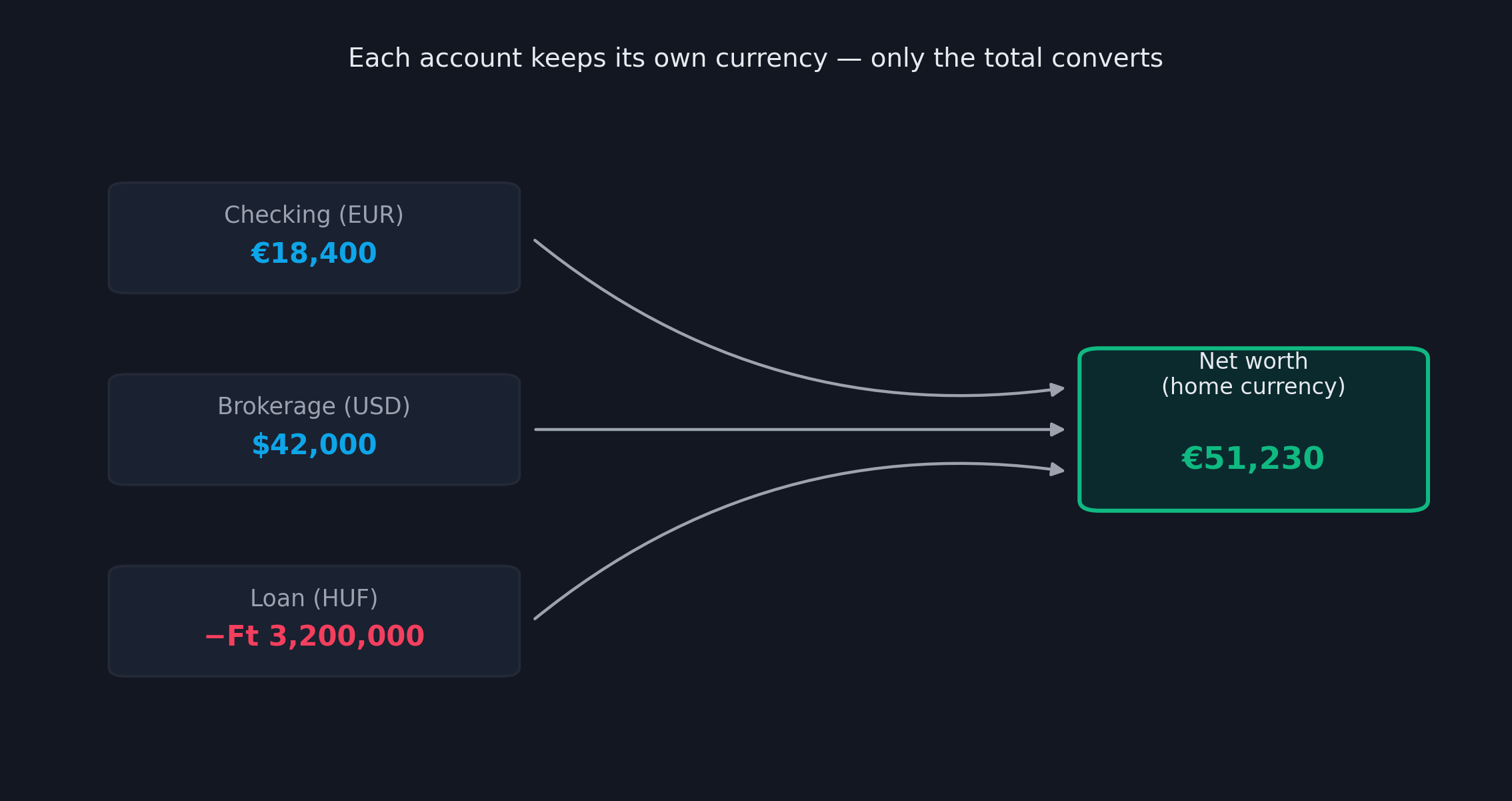 Illustrative example with made-up numbers. Each account keeps its own real currency; only the final total gets converted.
How FiscoTrail Handles This
This is exactly how every report in FiscoTrail is built to work, not bolted on as an afterthought.
Every account, loan, and asset can hold its own currency, set independently under Setup → Accounts and the equivalent Loans and Assets pages — a US-dollar brokerage account works correctly even if your home currency is euros or forints. Your Profile page is where you set that one home currency: the single figure everything converts into for totals, without restricting what any individual account is actually denominated in.
Exchange rates are fetched automatically, once a day, from the European Central Bank's published reference rates — the same source used across the euro area for official reporting, not a scraped or estimated feed. There's no API key to manage and nothing for you to configure.
Every conversion respects its own date. A transaction from six months ago converts using the rate as of that transaction's date, not today's. And once a month closes, its exchange rate — and every balance calculated with it — is locked permanently. Checking your March numbers next year shows the exact same figures as checking them today, even though the real EUR/USD rate has moved many times since.
A Worked Example
Say your home currency is EUR, and your finances look like this:
- Checking account (EUR): €18,400
- US brokerage account (USD): $42,000
- A loan back home (HUF): −Ft 3,200,000
FiscoTrail converts the USD brokerage balance and the HUF loan balance to EUR using each one's own current rate, then combines all three with your EUR checking balance into a single net worth figure — automatically, on the Dashboard, the Balance Sheet, and everywhere else a total appears. You never do the arithmetic yourself, and you never have to remember which rate applied to which account.
Why "Locked" Matters More Than It Sounds
This is the part that's easy to underestimate until you've been burned by it. Picture checking your net worth trend over the past year. If old months keep silently recalculating against today's exchange rate, the shape of that trend line has nothing to do with your actual financial decisions — it's partly just currency noise, and it gets worse the further back you look.
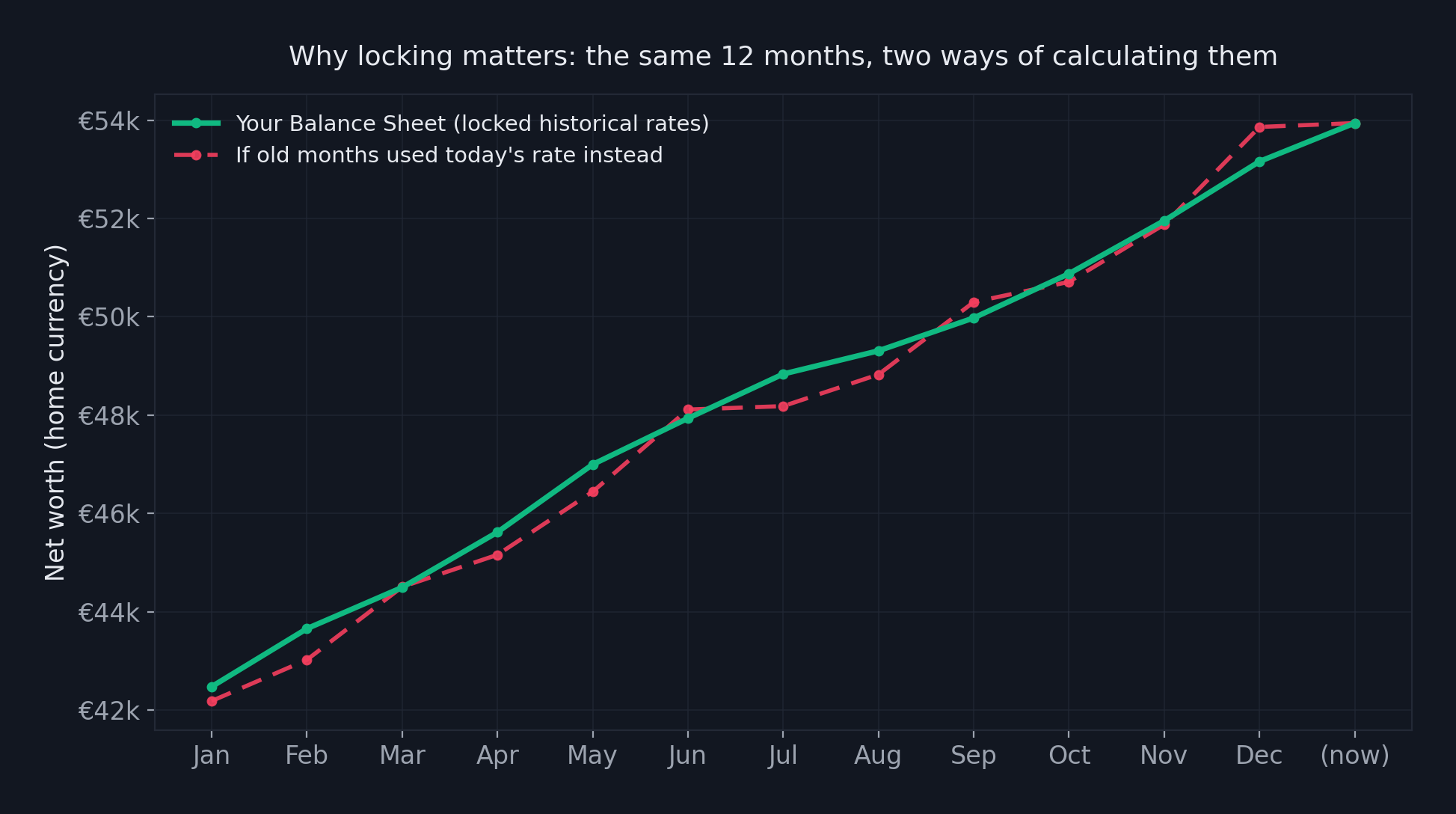 Illustrative example with made-up numbers. The locked line only moves forward as you actually save, spend, or invest. The naive line drifts every time the exchange rate does — even for months that are already over.
With rates locked at month-end, your historical trend reflects what actually happened to your finances — deposits, spending, investment growth — not what the currency markets happened to do after the fact. That distinction matters just as much on the Balance Sheet, which can show your financial position as of any past month, not just today.
Seeing Your Currency Exposure, Not Just the Total
One underrated benefit of keeping each account in its real currency: you can actually see how much of your net worth sits in which currency, rather than a single blended number that hides it.
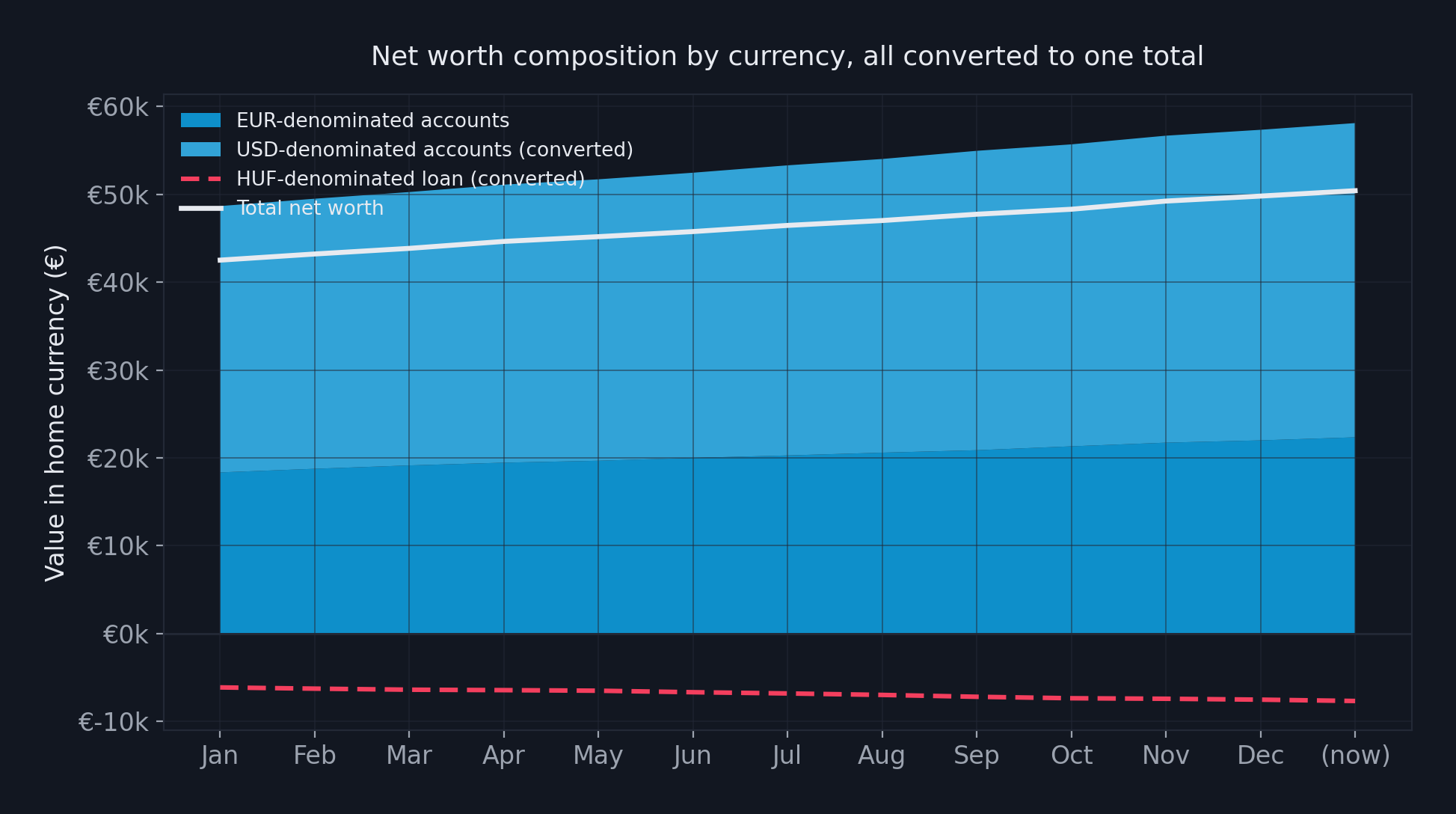 Illustrative example with made-up numbers. Seeing the split by currency, not just the converted total, makes it obvious how much of your net worth actually moves with exchange rates versus your own saving and spending.
This is especially relevant if you hold investments in a foreign currency — a US-dollar brokerage account denominated in dollars but reported in euros means part of your reported gain or loss on any given day is the stock moving, and part of it is the dollar moving against the euro. Seeing the currency breakdown separately is the only way to tell which is which.
This Isn't Just for Expats
While this matters most obviously if you've relocated, it's just as relevant if you simply hold assets across currencies for other reasons — a foreign property, a US-listed ETF, family finances split across two countries, or freelance income invoiced in a currency your bank account isn't. Anywhere a single "convert once, at today's rate" shortcut would quietly distort your numbers, this same logic applies.
Try It With Your Own Accounts
If your finances currently live in more than one currency and more than one spreadsheet tab, it's worth seeing what an actually accurate, always-up-to-date total looks like. FiscoTrail handles the conversion, the historical locking, and the daily rate updates automatically — you just enter your accounts in whatever currency they actually are.
You can create a free account and set up your first multi-currency account in a few minutes — no bank connection required, and nothing shared with anyone else.